
Tracking Organic Conversions
In the Airbridge dashboard, users who have installed the app without interacting with an advertisement are categorized as “unattributed” with only limited information available. However, by activating organic referrer attribution, you can gain visibility into the search engines the users utilized to discover your app and the website they visited immediately before installing your app.Why you need to track organic conversions
Why you need to track organic conversions
By having a clearer understanding of the unattributed conversions that can’t be directly associated with paid media, you can identify untapped opportunities for growth.Let’s say you ran a product launch campaign and observed the results below.
With organic referrer attribution enabled, you can obtain a more detailed breakdown, as shown in the example below.
How Airbridge collects data with referrers
A referrer serves as a digital breadcrumb trail that tells you where a user was before landing on a web page. Airbridge uses referrers to measure your organic performance and provides the attribution results via reports and raw data exports. The basic structure of a referrer resembles a web address, commonly known as a URL. Components such as the scheme, host, path, and query parameters build a referrer, but the specific composition may vary.Basic referrer structure
Basic referrer structure
The structure of a referrer typically includes the scheme, host, path, and query parameters, with details about the preceding web page mapped to each component.The table below shows how Airbridge collects data with referrers. The example referrer is as follows:
https://help.airbridge.io/guides/overview?q=ab180.AttentionReferrer information is limited on some platforms. You may not always have access to all the details about the preceding web page.
Attribution scenarios
To enable organic referrer attribution, you must have integrated the Airbridge Web SDK into your website. Below are some attribution scenarios.Users sent from third-party web to your website
Users sent from third-party web to your website
You can measure website visits as users are redirected from a third-party web page to your website.Let’s say a user navigated through a search engine to be redirected to your Airbridge-integrated website. Then, the user made a purchase on the website.
- User journey: Web search → Website visit → Conversion
Users sent from your website to your app
Users sent from your website to your app
You can measure Target Events that take place after users are redirected from your website to your app. You must have prepared the SDK to call the setDeeplinks function.Let’s say a user navigated through a search engine to be redirected to your Airbridge-integrated website. Then, the user clicked a deep link-embedded button on the website, opened the app store, and installed your app.
- User journey: Web search → Website visit → Deep link click → App store open → Conversion (Target Event)
Users sent from third-party web to your app
Users sent from third-party web to your app
You can measure HTTP deep link opens as users are redirected from a third-party web page to your app. Universal Links and App Links are the types of HTTP deep links used on iOS and Android, respectively.Let’s say a user navigated through a search engine and clicked on an HTTP deep link from the search results. Then, the user was redirected to your app, which had already been installed on the device.
- User journey: Web search → HTTP deep link click → App open
AttentionTo attribute in-app conversions with organic referrer attribution, your Airbridge App SDK should be at a certain version or higher.
- Android SDK: Version 2.19.5 or higher
- iOS SDK: Version 1.28.0 or higher
Attribution rules
With organic referrer attribution enabled, Airbridge can collect touchpoint data from your owned media and search engines. By connecting touchpoints with conversions, Airbridge reconstructs the user journey and determines the winning touchpoint according to the Airbridge attribution model. Note that organic referrer attribution can’t be used if referrers can’t be collected.Organic Referrer Attribution Setup
In the Airbridge dashboard, you can turn organic referrer attribution on or off and specify domains to exclude from attribution.Domain exclusion for organic referrer attribution
Domain exclusion for organic referrer attribution
Let’s say your website, Website B, has the Airbridge Web SDK integrated. A user visited Website A from a search engine and then visited Website B immediately afterward. The user performed a conversion event on Website B.
- User journey: Web search → Website A visit → Website B visit (Airbridge SDK integrated) → Conversion
Prerequisites
Before setting up organic referrer attribution, install the Airbridge Web SDK on your website.Domain setup
In the Airbridge dashboard, go to [Management]>[Attribution Rules] and select the [Additional Rules] tab.- Turn on the [Organic Referrer Attribution] toggle. Organic referrer attribution applies once the toggle is on.
- To add domains to exclude from attribution, click Edit. The maximum is 500 domains.
- Recommended Domains to Exclude: These domains are often collected as referrers but aren’t traffic sources. They are grouped into the following categories: Your website, Social login, Payment gateways, Identity verification, and Product reviews. Select domains to exclude as needed.
- Custom: Enter an address and select the scope to exclude: Entered address and subpaths, Addresses with subdomains and subpaths, or both.
- Recent Referrer Domains: These referrer domains were collected in the last 30 days. Select domains to exclude as needed.
- Click Save. You can edit the excluded domains at any time after saving.
Exclusion scope by option
Exclusion scope by option
For example, with
brand.com entered, each option excludes the addresses below.Schemes such as
https:// cannot be entered, and subdomains and paths are limited to one level.Query parameter mapping
Referrer structures vary, with each query parameter carrying distinct information. Check which parameters are mapped to Term. For instance, you can view the data collected by selecting the “Term” GroupBy or filter in the Actuals Report. Below is the default mapping setting:- The
q,query,p,text, andqtparameters are all mapped to Term. - The mapping priority is in the order of
q,query,p,text, andqt.
Query parameter mapping for organic referrer attribution
Query parameter mapping for organic referrer attribution
Depending on the domain, the parameters mapped to Term and their priority may differ from the default settings. Let’s say the two domains below have their own settings:
ab180.cowww.airbridge.io
ab180.co, the query, q, qt, and p parameters are mapped to Term, and the mapping priority is in the same order. For www.airbridge.io, keyword is the only parameter mapped to Term. For all other domains, default settings are applied. The table below shows the data collected in this case.How to View Organic Referrer Attribution Results
Airbridge provides organic referrer attribution results via reports and raw data exports.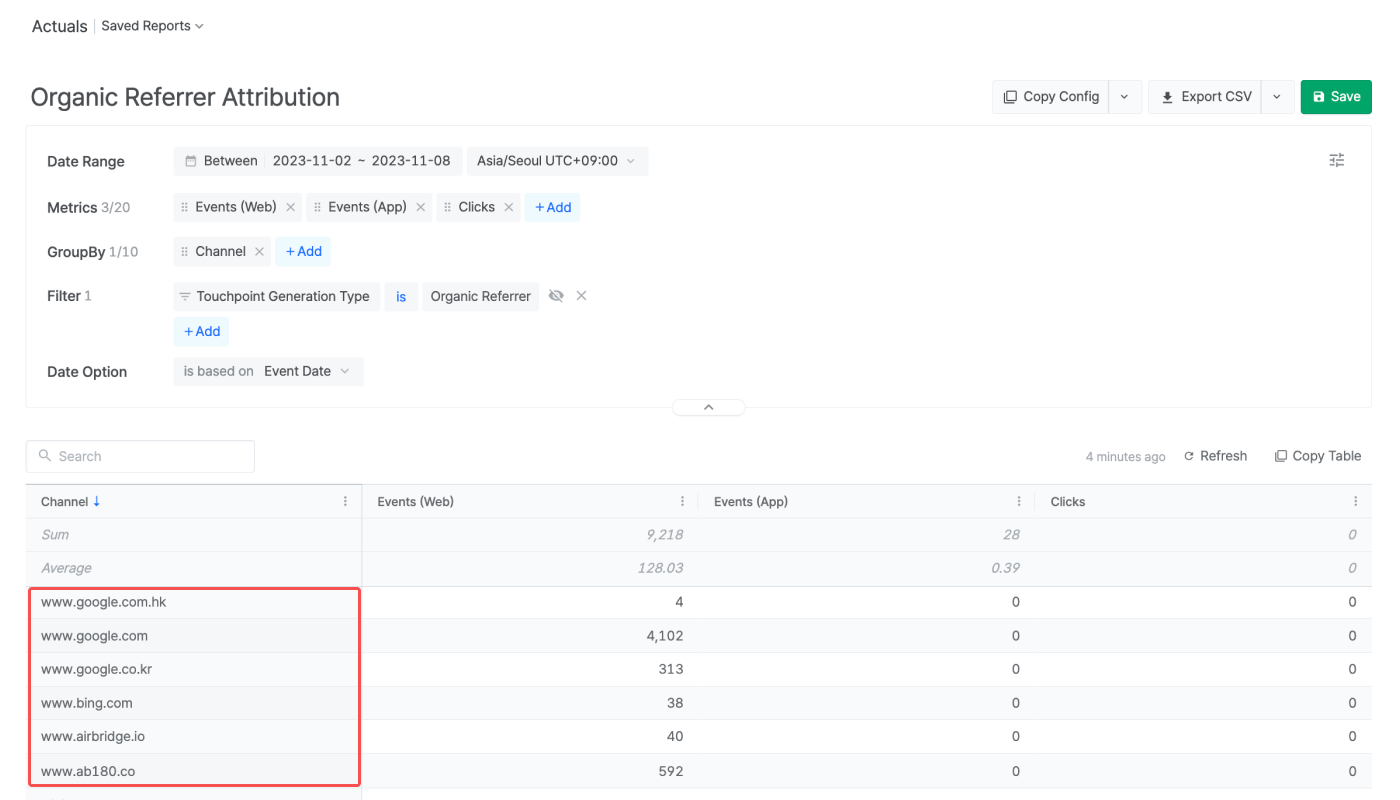
Attention
Use of organic referrer attribution
Use of organic referrer attribution
Organic referrer attribution provides insights into your owned media and their performance on search engines, mending any possible gaps in attribution. However, because referrer information is limited on some platforms, you may not be able to use organic referrer attribution in some cases.
Limitations to the use of Term
Limitations to the use of Term
Platform-specific policies and guidelines may occasionally restrict Airbridge from delivering data via Term. In addition, the path of a referrer, which can provide context about the user’s journey within the referring website, is not available in the Airbridge dashboard.
Limitations to the use of referral paths
Limitations to the use of referral paths
The path of a referrer can provide context about the user’s journey within the referring website. This information is not available in the Airbridge dashboard. The path of a referrer is used only to define the scope of excluded domains.
Time required to reflect domain setting changes
Time required to reflect domain setting changes
Updates to the list of excluded domains may take up to 3 days (72 hours) to be reflected in your organic referrer attribution results.Cookies stored are set to be valid for 3 days, and the updates can’t be reflected in cookies that have already been stored.