> ## Documentation Index
> Fetch the complete documentation index at: https://help.airbridge.io/llms.txt
> Use this file to discover all available pages before exploring further.
# Web Campaign Tracking - TikTok For Business
Airbridge supports TikTok For Business web campaign tracking through tracking links. This integration enables measurement of TikTok For Business web campaigns and allows you to view app conversions resulting from website visits.
## Integrate TikTok For Business web campaigns
Integrate TikTok For Business web campaigns and view your attribution data in the Airbridge dashboard.
### Required prerequisites
Complete all prerequisites before integrating TikTok For Business web campaigns.
| Item | Description | Location | Assignee | Reference |
| - | - | - | - | - |
| Add UTM parameters to web page URL | UTM parameters must be added to the web page URL. | TikTok For Business dashboard | Marketer | - |
| Request TikTok Conversions API (CAPI) setup | Conversions API must be set up to optimize events from TikTok web campaigns. | Contact your Airbridge CSM. If you don’t have a designated CSM, contact the [Airbridge Help Center](https://app.airbridge.io/supports). | Marketer | [Set up the TikTok Conversions API](/en/guides/tiktok-website-conversion#set-up-the-tiktok-conversions-api) |
| Set `utmParsing: true` in Airbridge Web SDK | The `utmParsing` option in the Airbridge Web SDK must be set to `true`. This enables Airbridge to collect and utilize UTM parameters. | Airbridge Web SDK | Developer | [Automatic UTM parameter setting](/en/developers/web-sdk#automatic-utm-parameter-setting) |
#### Set up the TikTok Conversions API
The TikTok Conversions API integration sends events collected by Airbridge to TikTok for Business. To set up the integration, follow these steps:
1. In the TikTok Ads Manager dashboard, find your Pixel ID and Access Token. For details, see [this guide](https://ads.tiktok.com/resources/help/article/tiktok-elevar-eapi-implementation-guide?lang=en).
2. Decide which Airbridge events to send through the Conversions API and the TikTok event to map to each. For the list of TikTok events, see [this documentation](https://business-api.tiktok.com/portal/docs/supported-events/v1.3).
3. Share the following information with your Airbridge CSM or through the [Airbridge Help Center](https://app.airbridge.io/supports):
* TikTok Pixel ID
* TikTok Access Token
* Airbridge event names to send and the TikTok event name mapped to each
Airbridge will notify you once the integration is complete.
### Optional prerequisites
If needed, refer to the TikTok For Business Help Center guide to complete the following:
* [About TikTok Pixel](https://ads.tiktok.com/help/article/tiktok-pixel?lang=en)
### Enter the webpage URL in TikTok For Business settings
1. Create an ad in the TikTok Ads Manager dashboard.
2. In **\[Ad Details]>\[Destination]**, select **Website URL**.
3. In **\[Destination URL]**, enter the website URL to send users to. Use the URL that includes the UTM parameters added during the prerequisite step.
4. In **\[Tracking]**, set up **\[Website events]**.
5. Complete the remaining settings and save.
## Set app store as the destination for TikTok For Business web campaigns
Learn how to set up app store destinations for TikTok For Business web campaigns to track app installs from your web traffic.
### Enter the app store URL in TikTok For Business settings
1. Create an ad in the TikTok Ads Manager dashboard.
2. Choose a campaign objective. Don't select **App** **Promotion** or **Awareness** as you want to track conversions attributed to web campaigns.
3. In **\[Ad Details]>\[Destination]**, select **Website URL**.
4. In **\[Destination URL]**, enter the app store URL where you want to send users.
5. In **\[Tracking]**, set up **\[App events]**.
6. Complete the remaining settings and save.
## TikTok For Business Reporting
Once you have completed the integration setup, you can view the TikTok For Business app and web campaign data in the Actuals Report. Refer to the following table for the report configuration and get a comprehensive view of the conversions from different platforms.
| Campaign environment | Filter: Channel is | Group by: Touchpoint Generation Type |
| - | - | - |
| App - Campaign objective: “App Promotion” or “Awareness” | tiktok | Self-attributing Network Tracking Link |
| Web - Campaign objective: other than “App Promotion” or “Awareness” - Using a web URL with UTM parameters | tiktok | UTM |
| Web - Campaign objective: other than “App Promotion” or “Awareness” - Not using a web URL with UTM parameters | tiktok | Self-attributing Network |
This documentation is built and hosted on [Mintlify](https://mintlify.com), a developer documentation platform.
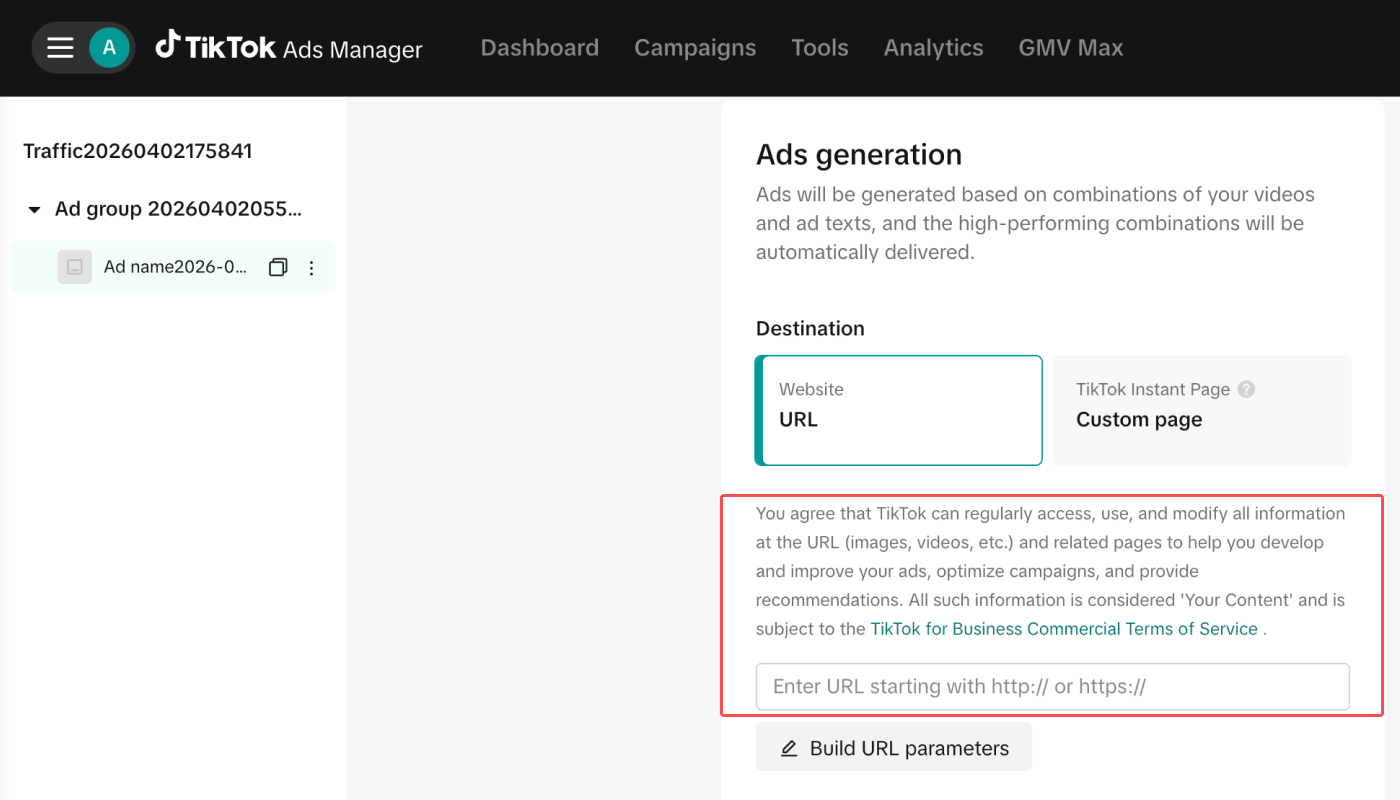 4. In **\[Tracking]**, set up **\[Website events]**.
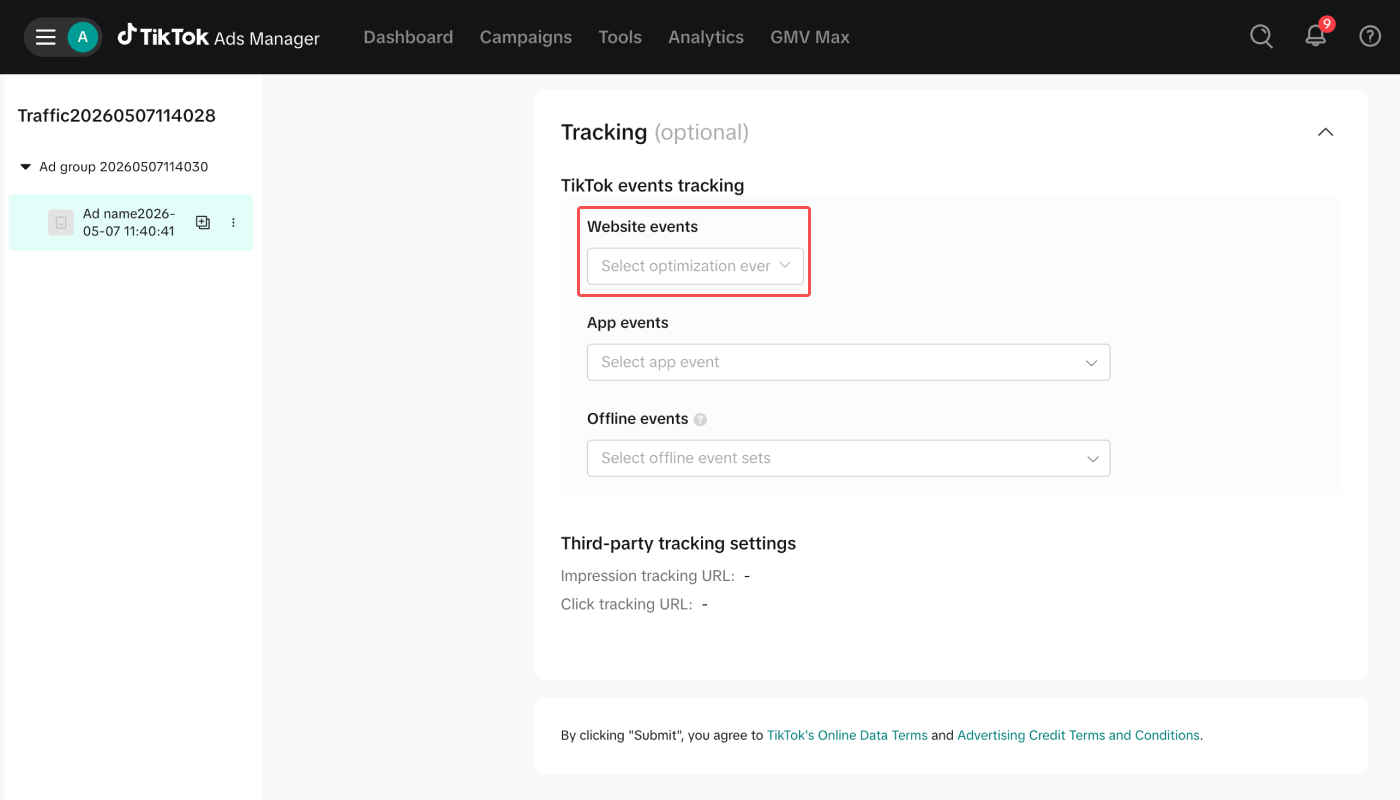 5. Complete the remaining settings and save.
## Set app store as the destination for TikTok For Business web campaigns
Learn how to set up app store destinations for TikTok For Business web campaigns to track app installs from your web traffic.
### Enter the app store URL in TikTok For Business settings
1. Create an ad in the TikTok Ads Manager dashboard.
2. Choose a campaign objective. Don't select **App** **Promotion** or **Awareness** as you want to track conversions attributed to web campaigns.
3. In **\[Ad Details]>\[Destination]**, select **Website URL**.
4. In **\[Destination URL]**, enter the app store URL where you want to send users.
5. Complete the remaining settings and save.
## Set app store as the destination for TikTok For Business web campaigns
Learn how to set up app store destinations for TikTok For Business web campaigns to track app installs from your web traffic.
### Enter the app store URL in TikTok For Business settings
1. Create an ad in the TikTok Ads Manager dashboard.
2. Choose a campaign objective. Don't select **App** **Promotion** or **Awareness** as you want to track conversions attributed to web campaigns.
3. In **\[Ad Details]>\[Destination]**, select **Website URL**.
4. In **\[Destination URL]**, enter the app store URL where you want to send users.
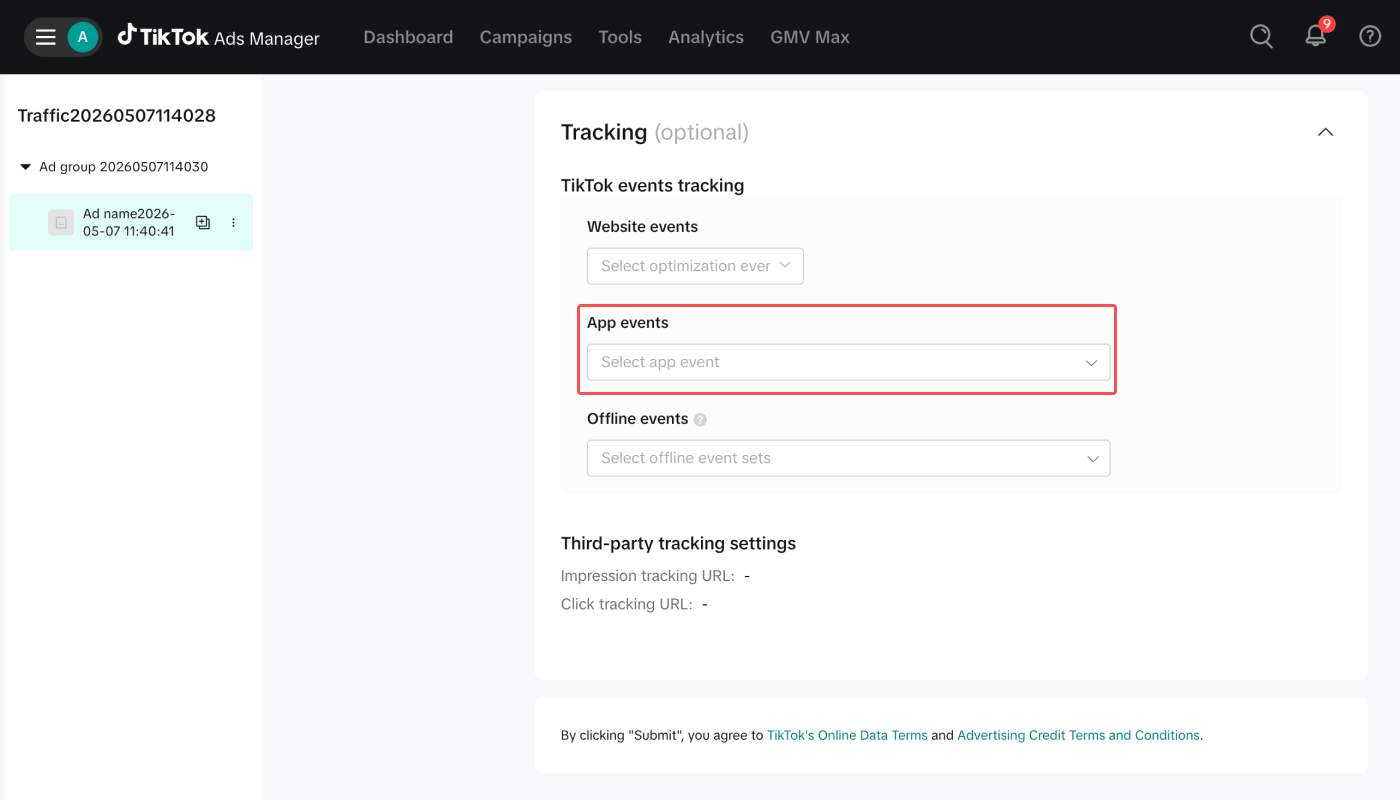 6. Complete the remaining settings and save.
## TikTok For Business Reporting
Once you have completed the integration setup, you can view the TikTok For Business app and web campaign data in the Actuals Report. Refer to the following table for the report configuration and get a comprehensive view of the conversions from different platforms.
| Campaign environment | Filter:
6. Complete the remaining settings and save.
## TikTok For Business Reporting
Once you have completed the integration setup, you can view the TikTok For Business app and web campaign data in the Actuals Report. Refer to the following table for the report configuration and get a comprehensive view of the conversions from different platforms.
| Campaign environment | Filter: