> ## Documentation Index
> Fetch the complete documentation index at: https://help.airbridge.io/llms.txt
> Use this file to discover all available pages before exploring further.
# FAQ - TikTok For Business
## Data Sharing Policy
Per the TikTok For Business data sharing policy, raw data for view-through campaigns is available only for events that occurred on or after September 9, 2026 (UTC).
Events that occurred before September 9, 2026 (UTC) are only partially available in raw data. For those events, only the parameters in the following table are available in raw data. The remaining data can be viewed only in aggregated form in Airbridge reports.
| Property | Description |
| - | - |
| Channel | The channel of the winning touchpoint |
| Sub Publisher | Sub-publisher of the winning touchpoint |
| Touchpoint Event Category | The event category of the winning touchpoint |
| Channel Type | The type of channel - Integrated channel - Custom channel - Unattributed |
| Touchpoint Generation Type | Touchpoint collection source - Tracking Link - Tracking Parameters - Self-Attributing Network - UTM - SDK (Web) - SDK (App) |
| Is View-Through | Whether the campaign is a view-through campaign or not |
| Target Event Category | The name of the [target event](/en/guides/airbridge-attribution-model#target-event) |
| Target Event Timestamp | The timestamp of the target event |
| Is First Target Event per Device | Whether the event is the first target event per device |
Network-level data identified by the channel name `tiktok` is available in raw data from August 1, 2022, and Sub Publisher data from August 2023.
## TikTok App ID
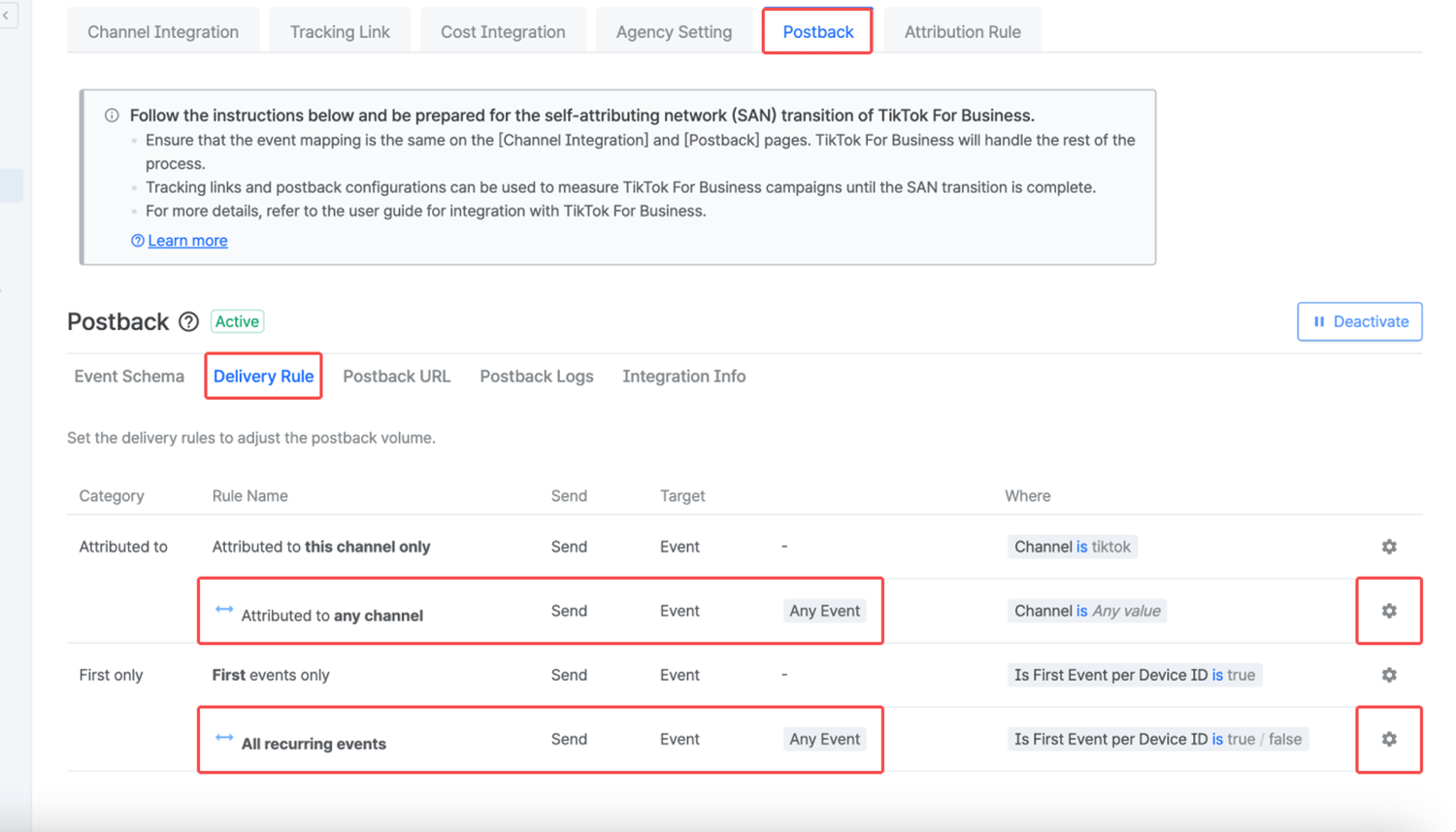
To ensure the TikTok App ID is verified by TikTok For Business, you need to configure the delivery rule to send events to TikTok For Business regardless of whether the event has been attributed to TikTok For Business or not.
To do that, select the **\[Delivery Rule]** tab, click the **\[settings]** icon of the "Attributed to any channel" and the "All recurring events" row, and select all events you want to send as postbacks.
This documentation is built and hosted on [Mintlify](https://mintlify.com), a developer documentation platform.